剛好想到RollBack這個東東
偶爾也會有需要用到所以就還是記下來
因為網路上其實範例不少了...
不過就重新再回憶一下隨手記錄
鴨爸 發表在 痞客邦 留言(0) 人氣(2,472)
WinForm應該就是下面這些方式了吧
如果用"C#中獲取程序當前路徑的幾種方法"
關鍵字去找還真的是一堆人有整理呀......
1.取得和設置當前目錄(即該進程從中啟動的目錄)的完全限定路徑。
string str = System.Environment.CurrentDirectory;
結果: C:\xxx\xxx
2.取得啟動了應用程序的可執行文件的路徑,不包括可執行文件的名稱。
string str = System.Windows.Forms.Application.StartupPath;
結果: C:\xxx\xxx
3.取得應用程序的當前工作目錄。
string str = System.IO.Directory.GetCurrentDirectory();
結果: C:\xxx\xxx
4.取得當前 Thread 的當前應用程序域的基目錄,它由程序集衝突解決程序用來探測程序集。
string str = System.AppDomain.CurrentDomain.BaseDirectory;
結果: C:\xxx\xxx\
5.取得和設置包含該應用程序的目錄的名稱。
string str = System.AppDomain.CurrentDomain.SetupInformation.ApplicationBase;
結果: C:\xxx\xxx\
6.取得啟動了應用程序的可執行文件的路徑,包括可執行文件的名稱。
string str = System.Windows.Forms.Application.ExecutablePath;
結果: C:\xxx\xxx\xxx.exe
7.取得當前執行的exe的文件名。
string str = System.Diagnostics.Process.GetCurrentProcess().MainModule.FileName;
結果: C:\xxx\xxx\xxx.exe
8.取得當前進程的完整路徑,包含文件名。
string str = this.GetType().Assembly.Location;
結果: C:\xxx\xxx\xxx.exe
鴨爸 發表在 痞客邦 留言(0) 人氣(1,807)
最近因為升級Server到2008
原本是用System.Net.Dns.GetHostAddresses(m_hostName).GetValue(0).ToString()
讀 IP可是回傳了這個東東...fe80::9151:ac18:e0fb:8458%14
原來是IPv6搞的鬼啦.....
鴨爸 發表在 痞客邦 留言(0) 人氣(3,421)
WinForm應該就是下面這些方式了吧
如果用"C#中獲取程序當前路徑的幾種方法"
關鍵字去找還真的是一堆人有整理呀......
1.取得和設置當前目錄(即該進程從中啟動的目錄)的完全限定路徑。
string str = System.Environment.CurrentDirectory;
結果: C:\xxx\xxx
2.取得啟動了應用程序的可執行文件的路徑,不包括可執行文件的名稱。
string str = System.Windows.Forms.Application.StartupPath;
結果: C:\xxx\xxx
3.取得應用程序的當前工作目錄。
string str = System.IO.Directory.GetCurrentDirectory();
結果: C:\xxx\xxx
4.取得當前 Thread 的當前應用程序域的基目錄,它由程序集衝突解決程序用來探測程序集。
string str = System.AppDomain.CurrentDomain.BaseDirectory;
結果: C:\xxx\xxx\
5.取得和設置包含該應用程序的目錄的名稱。
string str = System.AppDomain.CurrentDomain.SetupInformation.ApplicationBase;
結果: C:\xxx\xxx\
6.取得啟動了應用程序的可執行文件的路徑,包括可執行文件的名稱。
string str = System.Windows.Forms.Application.ExecutablePath;
結果: C:\xxx\xxx\xxx.exe
7.取得當前執行的exe的文件名。
string str = System.Diagnostics.Process.GetCurrentProcess().MainModule.FileName;
結果: C:\xxx\xxx\xxx.exe
8.取得當前進程的完整路徑,包含文件名。
string str = this.GetType().Assembly.Location;
結果: C:\xxx\xxx\xxx.exe
鴨爸 發表在 痞客邦 留言(2) 人氣(62,589)
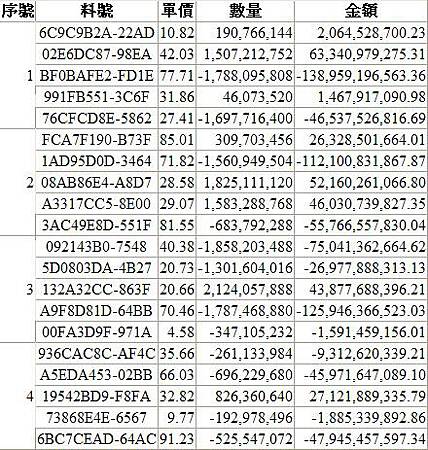
PreRender是在頁面呈現之前去觸發的所以選擇寫在GridView1_PreRender。
鴨爸 發表在 痞客邦 留言(0) 人氣(13,610)
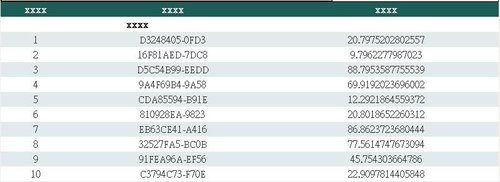
直接在建立資料列時就做表頭的合併動作
protected void GridView1_RowCreated(object sender, GridViewRowEventArgs e)
{
if (e.Row.RowType == DataControlRowType.Header)
{
// 建立自訂的標題
GridView gv = (GridView)sender;
GridViewRow gvRow = new GridViewRow(0, 0, DataControlRowType.Header, DataControlRowState.Insert);
GridViewRow gvRow1 = new GridViewRow(1, 0, DataControlRowType.Header, DataControlRowState.Insert);
// 增加欄位
TableCell tc1 = new TableCell();
tc1.Text = "xxxx";
gvRow.Cells.Add(tc1);
TableCell tc2 = new TableCell();
tc2.Text = "xxxx";
gvRow.Cells.Add(tc2);
TableCell tc3 = new TableCell();
tc3.Text = "xxxx";
gvRow.Cells.Add(tc3);
TableCell tc4 = new TableCell();
tc4.Text = "xxxx";
tc4.ColumnSpan = 2; // 跨二欄
gvRow1.Cells.Add(tc4);
TableCell tc5 = new TableCell();
tc5.Text = " ";
gvRow1.Cells.Add(tc5);
gvRow1.BackColor = System.Drawing.Color.White;
gvRow1.ForeColor = System.Drawing.Color.Black;
// 先清除原標題所有內容
e.Row.Cells.Clear();
// 加入自訂標題
gv.Controls[0].Controls.AddAt(0, gvRow);
gv.Controls[0].Controls.AddAt(1, gvRow1);
}
}
鴨爸 發表在 痞客邦 留言(0) 人氣(5,940)
最近有需求需要複製url到剪貼簿中
順手就記下來免得之後又忘了
簡單的一行就解決了
string Content = "要複製的內容";
string js = "javascript:window.clipboardData.setData('Text','" + Content + "');";
Page.ClientScript.RegisterStartupScript(this.GetType(), "Js", js, true);
鴨爸 發表在 痞客邦 留言(0) 人氣(1,427)
加解密一般都很常用到
以前為了密碼加解密也收集了幾種
不過也忘了是哪看來的
放著以後常常都用的到也不需要找來找去.....
鴨爸 發表在 痞客邦 留言(0) 人氣(3,650)
因為之前的需求用Javascript呼叫client的程式
然後client程式去開啟遠端的檔案
但是遠端的目錄只限制不可以任意打開
所以只好用模擬帳號的方式用程式去開檔案
鴨爸 發表在 痞客邦 留言(0) 人氣(3,120)
在GridView放一個Linkbutton或是ImageButton時
RowCommand event裡面沒有可以直接讀取index
如果要取得DataKeyNames的值就需要RowIndex才有辦法
有二種讀取的方式
鴨爸 發表在 痞客邦 留言(2) 人氣(12,486)
