剛好想到RollBack這個東東
偶爾也會有需要用到所以就還是記下來
因為網路上其實範例不少了...
不過就重新再回憶一下隨手記錄
鴨爸 發表在 痞客邦 留言(0) 人氣(2,472)
WinForm應該就是下面這些方式了吧
如果用"C#中獲取程序當前路徑的幾種方法"
關鍵字去找還真的是一堆人有整理呀......
1.取得和設置當前目錄(即該進程從中啟動的目錄)的完全限定路徑。
string str = System.Environment.CurrentDirectory;
結果: C:\xxx\xxx
2.取得啟動了應用程序的可執行文件的路徑,不包括可執行文件的名稱。
string str = System.Windows.Forms.Application.StartupPath;
結果: C:\xxx\xxx
3.取得應用程序的當前工作目錄。
string str = System.IO.Directory.GetCurrentDirectory();
結果: C:\xxx\xxx
4.取得當前 Thread 的當前應用程序域的基目錄,它由程序集衝突解決程序用來探測程序集。
string str = System.AppDomain.CurrentDomain.BaseDirectory;
結果: C:\xxx\xxx\
5.取得和設置包含該應用程序的目錄的名稱。
string str = System.AppDomain.CurrentDomain.SetupInformation.ApplicationBase;
結果: C:\xxx\xxx\
6.取得啟動了應用程序的可執行文件的路徑,包括可執行文件的名稱。
string str = System.Windows.Forms.Application.ExecutablePath;
結果: C:\xxx\xxx\xxx.exe
7.取得當前執行的exe的文件名。
string str = System.Diagnostics.Process.GetCurrentProcess().MainModule.FileName;
結果: C:\xxx\xxx\xxx.exe
8.取得當前進程的完整路徑,包含文件名。
string str = this.GetType().Assembly.Location;
結果: C:\xxx\xxx\xxx.exe
鴨爸 發表在 痞客邦 留言(0) 人氣(1,808)
.Net Framework要計算程式執行時間
真的是還滿簡單的啦
System.Diagnostics.Stopwatch大概是最常用的方式吧!!
方法1:
鴨爸 發表在 痞客邦 留言(0) 人氣(1,180)
最近因為升級Server到2008
原本是用System.Net.Dns.GetHostAddresses(m_hostName).GetValue(0).ToString()
讀 IP可是回傳了這個東東...fe80::9151:ac18:e0fb:8458%14
原來是IPv6搞的鬼啦.....
鴨爸 發表在 痞客邦 留言(0) 人氣(3,421)
WinForm應該就是下面這些方式了吧
如果用"C#中獲取程序當前路徑的幾種方法"
關鍵字去找還真的是一堆人有整理呀......
1.取得和設置當前目錄(即該進程從中啟動的目錄)的完全限定路徑。
string str = System.Environment.CurrentDirectory;
結果: C:\xxx\xxx
2.取得啟動了應用程序的可執行文件的路徑,不包括可執行文件的名稱。
string str = System.Windows.Forms.Application.StartupPath;
結果: C:\xxx\xxx
3.取得應用程序的當前工作目錄。
string str = System.IO.Directory.GetCurrentDirectory();
結果: C:\xxx\xxx
4.取得當前 Thread 的當前應用程序域的基目錄,它由程序集衝突解決程序用來探測程序集。
string str = System.AppDomain.CurrentDomain.BaseDirectory;
結果: C:\xxx\xxx\
5.取得和設置包含該應用程序的目錄的名稱。
string str = System.AppDomain.CurrentDomain.SetupInformation.ApplicationBase;
結果: C:\xxx\xxx\
6.取得啟動了應用程序的可執行文件的路徑,包括可執行文件的名稱。
string str = System.Windows.Forms.Application.ExecutablePath;
結果: C:\xxx\xxx\xxx.exe
7.取得當前執行的exe的文件名。
string str = System.Diagnostics.Process.GetCurrentProcess().MainModule.FileName;
結果: C:\xxx\xxx\xxx.exe
8.取得當前進程的完整路徑,包含文件名。
string str = this.GetType().Assembly.Location;
結果: C:\xxx\xxx\xxx.exe
鴨爸 發表在 痞客邦 留言(2) 人氣(62,558)
最近剛好有Table 沒有設定PK值
有一堆資料重複了必須要刪除重複的資料所以參考了別人的寫法
應該是還有很多吧...不過反正成功就好了
鴨爸 發表在 痞客邦 留言(0) 人氣(1,598)
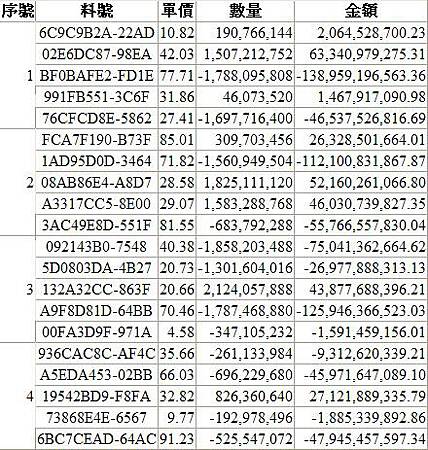
PreRender是在頁面呈現之前去觸發的所以選擇寫在GridView1_PreRender。
鴨爸 發表在 痞客邦 留言(0) 人氣(13,608)
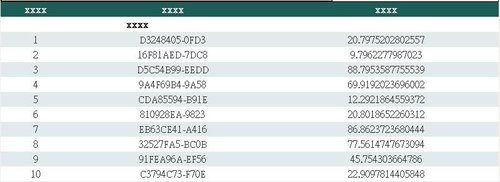
直接在建立資料列時就做表頭的合併動作
protected void GridView1_RowCreated(object sender, GridViewRowEventArgs e)
{
if (e.Row.RowType == DataControlRowType.Header)
{
// 建立自訂的標題
GridView gv = (GridView)sender;
GridViewRow gvRow = new GridViewRow(0, 0, DataControlRowType.Header, DataControlRowState.Insert);
GridViewRow gvRow1 = new GridViewRow(1, 0, DataControlRowType.Header, DataControlRowState.Insert);
// 增加欄位
TableCell tc1 = new TableCell();
tc1.Text = "xxxx";
gvRow.Cells.Add(tc1);
TableCell tc2 = new TableCell();
tc2.Text = "xxxx";
gvRow.Cells.Add(tc2);
TableCell tc3 = new TableCell();
tc3.Text = "xxxx";
gvRow.Cells.Add(tc3);
TableCell tc4 = new TableCell();
tc4.Text = "xxxx";
tc4.ColumnSpan = 2; // 跨二欄
gvRow1.Cells.Add(tc4);
TableCell tc5 = new TableCell();
tc5.Text = " ";
gvRow1.Cells.Add(tc5);
gvRow1.BackColor = System.Drawing.Color.White;
gvRow1.ForeColor = System.Drawing.Color.Black;
// 先清除原標題所有內容
e.Row.Cells.Clear();
// 加入自訂標題
gv.Controls[0].Controls.AddAt(0, gvRow);
gv.Controls[0].Controls.AddAt(1, gvRow1);
}
}
鴨爸 發表在 痞客邦 留言(0) 人氣(5,938)
最近有需求需要複製url到剪貼簿中
順手就記下來免得之後又忘了
簡單的一行就解決了
string Content = "要複製的內容";
string js = "javascript:window.clipboardData.setData('Text','" + Content + "');";
Page.ClientScript.RegisterStartupScript(this.GetType(), "Js", js, true);
鴨爸 發表在 痞客邦 留言(0) 人氣(1,427)
