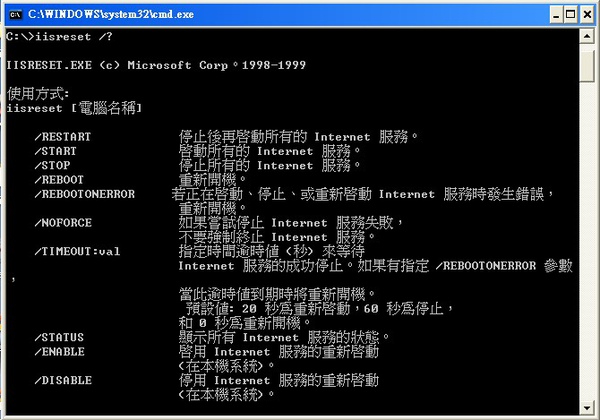
這個一般直接在IIS Server上面直接重新啟動就可以啦
剛好有需要排程做自動重新啟動
反正很簡單但是可能還是有人會不熟悉
所以就記錄一下囉....google 一下也是多到不行
鴨爸 發表在 痞客邦 留言(0) 人氣(27,477)
如果TextBox在MultiLine的模式下
就沒有辦法直接設定了
可以直接用javascript去控制
有測過一到限制字數就沒辦法再增加了
鴨爸 發表在 痞客邦 留言(0) 人氣(5,807)

最近在執行一支程式的時候
因為裡面有呼叫Web Service
結果莫名奇妙的出現了錯誤訊息.....
可是我不久前才執行過都很正常沒有問題.....
鴨爸 發表在 痞客邦 留言(0) 人氣(3,982)
雖然目前不知道這個要用在哪裡啦...
不過我想也許還是用的著....
就給它記下來囉
byte[] big5Bytes = null;
string FilePath = Server.MapPath("~/txt/test.txt");
using (System.IO.FileStream fs = new System.IO.FileStream(FilePath, System.IO.FileMode.Open))
{
//讀big5編碼bytes
big5Bytes = new byte[fs.Length];
fs.Read(big5Bytes, 0, (int)fs.Length);
}
//將big5轉成utf8編碼的bytes
byte[] utf8Bytes = System.Text.Encoding.Convert(System.Text.Encoding.GetEncoding("BIG5"), System.Text.Encoding.UTF8, big5Bytes);
//將utf8 bytes轉成utf8字串
System.Text.UTF8Encoding encUtf8 = new System.Text.UTF8Encoding();
string utf8Str = encUtf8.GetString(utf8Bytes);
Response.Write(utf8Str);
鴨爸 發表在 痞客邦 留言(0) 人氣(10,923)
剛好有一個需求是要去讀網頁資訊
之前就有寫過類似的東東....
就再研究一下
這個需求是參考下列這二個地方的資訊
鴨爸 發表在 痞客邦 留言(0) 人氣(1,961)
